Integrating Pinsetter Line Single Line into Your Creative Workflow
In the world of design and crafting, the aesthetic of a single, continuous line holds a particular appeal. It conveys elegance, modernity, and a minimalist sensibility. This has led to the rising popularity of single-line and hairline fonts, tools that allow creators to produce text that looks hand-drawn or engraved rather than printed. For makers, designers, and entrepreneurs looking to incorporate this style, the Pinsetter Line Single Line font offers a robust and versatile solution, designed to bridge the gap between digital design and physical output.
This font is not a standard typeface for typing documents. It is a specialized asset engineered for specific creative processes. Understanding what it is, how it functions, and where it fits into your project pipeline is key to using it effectively. Pinsetter Line is built around a core concept: providing three distinct alphabetical personalities within one cohesive font family, accessible in formats that modern creative software can interpret correctly.
Understanding the Font's Core Structure
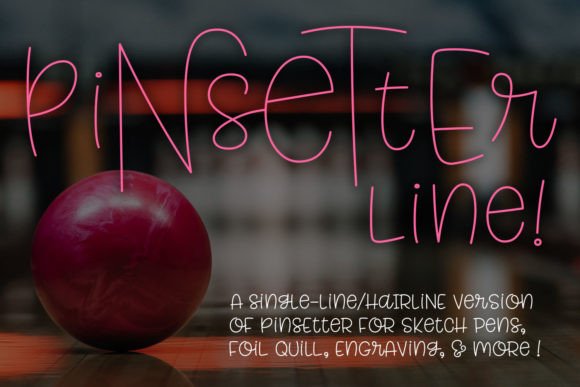
At its heart, Pinsetter Line is a single font file that contains three interconnected alphabets, referred to as Littles, Middles, and Talls. The Littles serve as the base character set. The Middles and Talls are integrated as alternate characters, allowing you to vary the height and style of letters within a single word or phrase. This creates a dynamic, hand-lettered effect that adds visual interest and a custom feel to any project.
The practical implementation of these alternates is straightforward. The entire character set is PUA-encoded, which stands for Private Use Area. This is a technical feature that ensures all the alternate glyphs are accessible even in programs that do not have advanced OpenType feature support. You can access every letter variation directly from your character map or font selection panel. For absolute convenience, a companion PDF listing all characters is provided, enabling you to simply copy and paste the exact glyph you need into your design software.
The Critical Difference: Single-Line vs. Hairline Formats
The most important technical aspect of Pinsetter Line is its delivery in two distinct file types. This is where many users encounter confusion, and getting it right saves significant time and frustration. The font is provided as both a single-line version and a hairline version. These are not interchangeable; they are designed for different software ecosystems and output methods.
- Single-Line Style: This is a true single-stroke font. The letterforms are constructed from a single line with no outline or fill. This format is compatible with a limited number of specialized programs, particularly those that can interpret open vector paths for direct output to tools like engravers or certain pen plotters. If your workflow involves software that specifically requires a true single-stroke font, this is the file you need.
- Hairline Style: This version uses ultra-thin, closed vector outlines. To the naked eye, it appears as a single line, but it is technically a very narrow filled shape. This format is universally compatible with most vector-based design programs like Adobe Illustrator, CorelDRAW, and Inkscape. Crucially, it is also the format used by the majority of consumer crafting software, including Cricut Design Space and Silhouette Studio, for sketch pen, foil quill, and infusible ink pen applications.
The recommendation is simple: if you are unsure which format your software needs, download and install both. You can then determine through testing which one produces the desired single-line effect in your specific application. The hairline version will be the correct choice for the vast majority of users working with common design and cutting machines.
Practical Applications in Your Projects
Pinsetter Line Single Line is not for word processing, standard printing, or vinyl cutting where a solid, filled shape is required. Its purpose is specific to tools that draw letters. Integrating it into your workflow means identifying the right stage of a project where its unique properties become an advantage.
Pre-Project Planning and Asset Organization
Before starting a project, consider organizing your installed fonts. Because Pinsetter Line contains multiple alphabets, creating a reference sheet—using the provided PDF—can be a helpful planning step. You can mark which character styles (Littles, Middles, Talls) you prefer for different types of projects, such as elegant wedding invitations versus playful birthday cards. This foresight streamlines the design phase.
During the Design and Execution Phase
This is where the font truly shines. Its use cases are defined by the output tool:
- Sketch Pen Projects: Use the hairline version in your cutting machine software to have your machine draw text instead of cut it. This is ideal for greeting cards, notebook covers, and planner stickers where a handwritten look is desired.
- Foil Quill and Infusible Ink Pens: For projects involving heat-activated foil or sublimation ink, the hairline font provides the precise path needed for the quill or pen to follow, creating stunning metallic or permanent text on paper, fabric, or other compatible materials.
- Engraving and Etching: For users with laser engravers or rotary tools that follow vector paths, the single-line version can be used to engrave text directly onto wood, acrylic, leather, or metal. The single-stroke path is often more efficient and can produce a finer result than engraving the outline of a standard font.
- Digital Design and Mockups: Even for purely digital work, such as creating social media graphics or website headers, the hairline font can add a delicate, crafted touch that stands out from standard bold or serif fonts.
Post-Project and Quality Control
After creating a physical item, review the consistency of the drawn lines. This is where the font's design proves its value. The consistent stroke weight (whether from the single-line or hairline version) ensures a professional finish. If you notice skipping or inconsistencies, it is often a matter of adjusting the pressure or speed settings on your machine, not a flaw in the font itself. Keeping a log of optimal machine settings for different materials with this font can become a valuable part of your personal workflow knowledge base.
Integrating Pinsetter Line into a Broader Workflow
For a small business owner or freelancer, this font can become a key part of a branded product line. Imagine using it to consistently add a signature handwritten quote to packaging, thank-you notes, or product tags. The alternates within the font allow for variation without straying from a cohesive brand aesthetic. For educators, it can be used to create engaging, drawn-style classroom materials or personalized student awards.
The efficiency gain comes from its versatility. Having one font that covers three stylistic variations and two technical formats reduces the need to hunt for and manage multiple separate fonts. The PUA encoding and PDF guide eliminate guesswork in accessing characters, speeding up the design process.
When working with clients or collaborators, clarity is key. If you are sending a design file for someone else to output, ensure you specify which version of the font (single-line or hairline) they need and provide it if they don't have it. Embedding the font or outlining the text (converting to shapes) in the final file sent for production is a best practice to avoid compatibility issues.
Long-Term Use and Considerations
As with any specialized tool, the value of Pinsetter Line Single Line is realized over multiple projects. Its durability lies in its design quality and the practicality of its dual-format delivery. As software updates occur, the hairline version, being a standard vector outline, will likely remain compatible. The single-line version's compatibility is more dependent on the specific software's support for true single-stroke fonts, so staying informed about your tools' capabilities is wise.
Ultimately, integrating this font is about understanding a specific niche in the creative process. It replaces the default, blocky text drawing functions of machines with a tool designed for elegance and precision. By choosing the right file for your software, planning your character usage, and applying it to the appropriate projects, Pinsetter Line Single Line becomes more than just a font—it becomes a reliable component in producing professional, distinctive, and beautifully crafted work.