Integrating Signaturia: A Practical Guide to Using a Signature Font in Your Workflow
Understanding Signaturia's Role in Modern Design
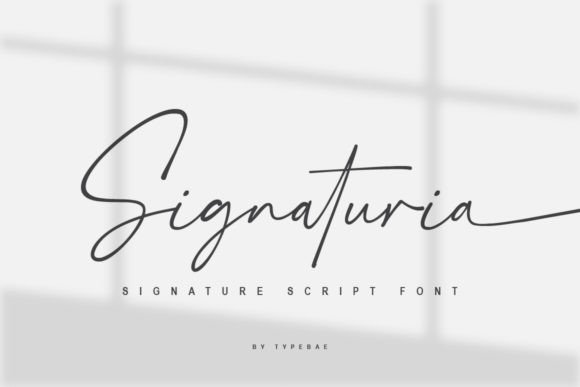
In the landscape of digital creation, typography is a foundational decision that impacts the entire project lifecycle. Signaturia is a specialized typeface designed to emulate natural handwriting, characterized by its elegant tails and binding letter combinations. Unlike standard serif or sans-serif fonts used for body text, Signaturia serves a specific functional role: it provides an authentic, human touch to digital assets. Its primary utility lies in its ability to bridge the gap between cold, digital precision and the warmth of personal communication. For professionals, creators, and business owners, understanding where this font fits is the first step toward effective implementation. It is not a replacement for workhorse fonts but rather a strategic asset for headers, logos, watermarks, and personalized correspondence.
The Technical Advantage: Accessibility and Usability
A significant barrier to using advanced typography is often the requirement for professional design software with OpenType feature support. Signaturia addresses this common friction point through its architectural design. Because the beginning and ending swashes are provided as separate, accessible characters, the font bypasses the need for complex software toggles. This approach simplifies the implementation phase, allowing users to access stylistic flourishes directly from their standard character maps or basic text editors. This compatibility is crucial for maintaining workflow efficiency, particularly for users who operate across multiple platforms or utilize web-based design tools that have limited OpenType support. The result is a streamlined process where the focus remains on the creative output rather than technical troubleshooting.
Strategic Implementation Across Workflows
Integrating a signature font like Signaturia requires a process-oriented mindset. It is most effective when applied at specific stages of a project where personalization adds value. For instance, in the planning and branding phase, Signaturia can be used to draft logo concepts that require a handwritten aesthetic. During the execution phase, such as creating social media graphics or email headers, the font allows for rapid prototyping of designs that feel bespoke. Finally, in the quality control and delivery phase, it ensures that final assets, such as thank-you cards or digital signatures, maintain a consistent, authentic voice.
Workflow Example: Content Creation and Marketing
Consider a typical content marketing workflow. A freelancer or small business owner is tasked with creating a series of Instagram posts and a corresponding email newsletter. The process might unfold as follows:
- Asset Preparation: The creator selects Signaturia for the headline text of the graphics to evoke a personal, editorial feel.
- Execution: Instead of navigating complex typography panels, the creator simply types the text and selects specific letters to access the swash variations, ensuring the beginning and end of the headline have elegant flourishes.
- Integration: The same font is then carried over to the email subject line or signature block, creating visual cohesion across the campaign.
- Review: The creator checks the flow of the binding letters to ensure the text is legible and the style aligns with the campaign's tone.
This sequence demonstrates how Signaturia fits into a linear process, enhancing the visual hierarchy without introducing unnecessary complexity.
Compatibility and Tool Integration
No asset exists in a vacuum. The effectiveness of Signaturia depends on how well it interacts with the rest of your technology stack. Because it is designed to function without specialized OpenType software, it pairs exceptionally well with common productivity and design tools. Users can effectively deploy it within:
- Web Builders: Platforms like Squarespace, Wix, or WordPress, where custom font uploads are supported but advanced typography features may be limited.
- Standard Office Suites: Microsoft Word or Google Docs for creating personalized proposals, invoices, or internal documents.
- Basic Graphic Design Tools: Applications like Canva, where users can upload the font and easily access the stylistic alternates via the standard character set.
By ensuring compatibility with these widely used platforms, Signaturia supports a flexible workflow, allowing the user to maintain design consistency whether they are working on a desktop application or a mobile device.
Practical Tips for Usability and Organization
To maximize the utility of Signaturia, it is advisable to establish a clear set of guidelines for its use within your projects. This organizational step prevents overuse and maintains its impact.
- Contextual Application: Reserve Signaturia for high-impact, low-volume text. It is ideal for signatures, short headers, and pull quotes, but less effective for long-form reading due to its script nature.
- Character Management: Familiarize yourself with the specific keys that trigger the beginning and ending tails. Creating a small "cheat sheet" or a text file with your preferred swash combinations can significantly speed up the production process.
- File Management: When organizing your font library, keep the standard and swash variations clearly labeled. This ensures that when you or a team member needs to implement the font, the correct version is immediately accessible.
Long-Term Use and Consistency
For brands and professionals, consistency is a key component of trust. Over time, the consistent use of a typeface like Signaturia in specific contexts—such as a weekly newsletter sign-off or a recurring social media template—builds a recognizable visual identity. This long-term application transforms the font from a simple design element into a brand asset. It is important, however, to periodically review how the font is being used. As design trends evolve, the application of the swashes may need to be adjusted to remain fresh. Furthermore, because Signaturia facilitates a natural appearance, it can help soften the tone of corporate communications, making them feel more approachable and human—a valuable trait in an increasingly automated digital environment.
Quality Control and Final Output
The final stage of any project involving typography is quality control. When using Signaturia, this involves checking the visual "kerning" or spacing between the swash letters and adjacent characters. While the font is designed to flow seamlessly, certain letter combinations may require manual adjustment to ensure they do not overlap awkwardly or appear too distant. This step is particularly important for logo design or high-resolution print materials. By paying attention to these details during the review process, users ensure that the final product reflects the intended elegance and professionalism, fully leveraging the unique characteristics of the Signaturia typeface to achieve a polished, authentic result.