Mastering the Bon Appetit Font: A Guide to Authentic, Watercolor Typography
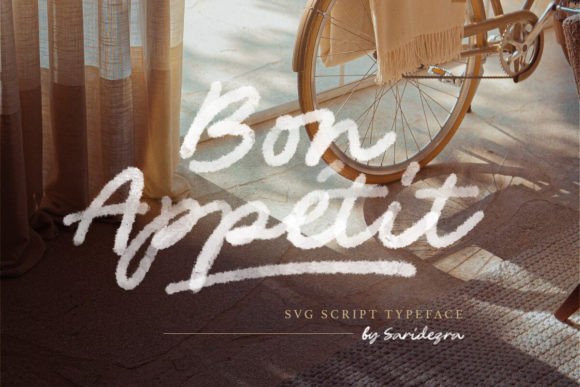
In the crowded world of digital design, finding a typeface that bridges the gap between professional polish and organic charm can be a challenge. Enter Bon Appetit, a script font that has captured the attention of creators ranging from seasoned graphic designers to small business owners crafting their first logo. What sets this font apart is its unique transparency watercolor texture. Unlike standard vector fonts that offer a flat, solid color, Bon Appetit delivers a hand-painted aesthetic right out of the box. However, because it utilizes advanced SVG (Scalable Vector Graphics) technology, using it effectively requires a shift in how you typically approach typography. If you are looking to add a natural, handmade feel to your projects without spending hours scanning and digitizing your own calligraphy, understanding the nuances of this asset is essential.
The Critical First Step: Understanding SVG vs. Standard Vector
The most common stumbling block for users downloading Bon Appetit for the first time is file confusion. The package comes with two distinct versions: an SVG OTF and a Vector OTF. A frequent mistake is installing the standard Vector OTF, typing out a headline, and then wondering why the beautiful watercolor texture is missing.
The SVG OTF is the star of the show. This file embeds high-resolution image data directly into the font code, allowing the characters to display those transparent, textured brush strokes. It is the version that looks truly "handmade." However, this comes with a technical limitation: SVG fonts are generally raster-based at their core. This means if you scale them up to an astronomical size for a billboard, you might eventually see pixelation, though they are perfect for standard web use and print.
Conversely, the Vector OTF is a traditional font. It contains the same shapes and ligatures but renders as a solid, flat color. It is infinitely scalable and is the better choice if you need to apply a single solid color without texture, or if you are working in software that does not support color fonts (like older versions of Word or some basic text editors). Do not discard the Vector version; think of it as the structural skeleton, while the SVG version is the painted skin.
Overlooking Ligatures: The Secret to a Natural Flow
One of the defining features of Bon Appetit is its extensive set of ligatures. In typography, a ligature occurs when two or more letters are combined into a single character to improve flow. For a script font, this is non-negotiable for realism. If you type "Th" or "fl" and the letters awkwardly crash into each other or look identical every time they appear, the illusion of handwriting is broken.
A common error is leaving ligatures turned off in your design software (such as Adobe Photoshop or Illustrator). By default, some programs may not enable "Standard Ligatures" or "Contextual Alternates." If your text looks repetitive or disjointed, check your Character or OpenType panel. Enabling these features allows the font to swap out standard letters for special connecting characters, making the text flow as if it were written in a single breath. This is particularly vital for logos and wedding invitations where the elegance of the script is the main selling point.
The "Underline" for Dramatic Effect
When using a font like Bon Appetit, the goal is often to create a focal point. While the watercolor texture provides visual interest, the composition needs structure. This is where the strategic use of the underline comes into play. Many beginners either overuse decorative elements or leave the text floating too loosely in the design.
Using an underline with Bon Appetit is not just about grammar; it is a design choice to anchor the text. Because the font has a "wet" paint look, a hand-drawn underline or a solid, contrasting bar can help separate the text from a busy background image. However, be cautious with spacing. If the underline is too tight against the descenders (the tails of letters like 'y' or 'g'), it creates visual clutter. Ensure there is breathing room. The goal of the underline is to create a dramatic look that guides the viewer's eye, not to suffocate the typography.
Software Compatibility and Color Limitations
Before you commit to using Bon Appetit for a client project or a major marketing campaign, you must verify your software environment. SVG fonts are not universally supported. They work beautifully in recent versions of Adobe Photoshop, Illustrator, and InDesign. They also function well in many online editors like Canva. However, if you are trying to use the SVG version in Microsoft Word, older operating systems, or basic email clients, the font will likely fail to render or will revert to a generic fallback font.
Furthermore, a misunderstanding about color is common. Because the SVG version contains a pre-baked texture, you cannot simply "bucket fill" the letters with a gradient or a complex pattern in the same way you would with a standard vector shape. You are generally changing the hue of the existing watercolor texture. If you need a neon green texture, you will be tinting the original paint strokes. If you require total control over the color values pixel-by-pixel, you may need to convert the text to a shape or smart object, which sacrifices editability.
Practical Application: Avoiding the "Messy" Look
The allure of the "handmade" aesthetic is strong, but it carries a risk: looking unprofessional or chaotic. Because Bon Appetit is a display script, it is not designed for body text. Using it for long paragraphs will result in a wall of textured paint that is incredibly difficult to read, causing eye strain for your audience.
Better Approach: Reserve Bon Appetit for headlines, sub-headlines, or single-word call-outs. Pair it with a clean, sans-serif font (like Montserrat or Helvetica) for your body text. The contrast between the organic, textured script and the geometric precision of a sans-serif creates a balanced hierarchy. This ensures your design looks curated and intentional rather than thrown together.
Final Checks Before You Design
Before you finalize your project using Bon Appetit, run through this quick checklist to ensure quality and efficiency:
- Zoom Check: Since the SVG version is rasterized, zoom in to 100% (or your print size) to ensure the texture holds up and doesn't look blurry.
- Background Contrast: Watercolor textures can get lost on noisy backgrounds. Ensure your background is relatively simple or use a drop shadow to lift the text.
- Kerning: Even with ligatures, check the spacing between specific letter pairs. Handwritten fonts often need manual kerning adjustments to look perfect.
- File Delivery: If sending a file to a printer or client, outline the fonts or flatten the image to ensure the texture displays correctly on their end.
By respecting the technical nature of the Bon Appetit font and utilizing its ligatures and underlining features thoughtfully, you can elevate your work from amateur to artisan. It is a powerful tool for adding personality to a brand, provided you navigate its technical requirements with care.