Mastering Billo: How to Use This Marker Script Font Without Looking Amateurish
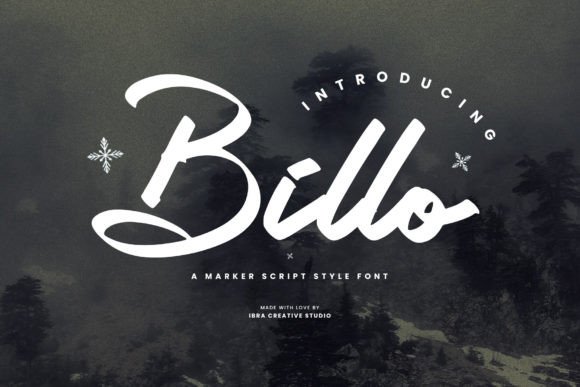
There is something inherently magnetic about typography that mimics human imperfection. In a digital landscape often dominated by rigid, geometric sans-serifs, Billo arrives like a breath of fresh air. As a marker script style font, it radiates an unmistakable blend of casual flair and lively charm. With its handcrafted strokes reminiscent of a marker’s fluid motion, this font captures the essence of spontaneity and creativity. Billo’s characters dance across the page with a playful rhythm, infusing any design with a sense of warmth and approachability. The letters exhibit a casual elegance, making it ideal for projects seeking a friendly yet stylish touch.
However, the very qualities that make Billo so appealing—its energy, its irregularity, and its boldness—are also the source of the most common design pitfalls. I have seen too many entrepreneurs, marketers, and hobbyists download a script font like Billo with high hopes, only to produce a final product that looks cluttered, illegible, or jarring. The issue is rarely the font itself; the issue is the application. If you are considering Billo for your next project, or if you have recently added it to your toolkit, here is how to navigate the common mistakes that trip up even seasoned creators.
The Legibility Trap: Size and Spacing
The most frequent error users make with marker fonts is underestimating how much space they demand. Because Billo mimics the natural flow of a felt-tip pen, it possesses a distinct texture and weight. When you force Billo into small spaces—think 10-point body text or dense subtitles—you destroy the very charm you sought to capture. The "ink" strokes bleed together, turning your elegant script into an unreadable squiggle.
The Correction: Treat Billo as a display font, not a workhorse for long paragraphs. It is designed to shout, not whisper. Before you finalize your design, print it out or view it on a mobile device. If you have to squint to read the text, you have chosen the wrong size. A good rule of thumb is to keep Billo for headers, logos, or short call-to-action phrases where the text can breathe.
Furthermore, pay close attention to leading (line spacing) and kerning (space between letters). Marker scripts often have high ascenders and descenders—the parts of the letters that go above and below the main line. If your lines are too tight, the "b" from one line will crash into the "g" of the line above. Increase your line height to at least 130% or 140% to let the characters dance without stepping on each other's toes.
The Context Mismatch: When Casual Becomes Careless
One of the most damaging misunderstandings about Billo is assuming that "casual" means "appropriate for everything." Billo radiates warmth, which is fantastic for a bakery logo, a lifestyle blog, or a children’s educational app. However, if you are designing a pitch deck for a Series A funding round, a legal disclaimer for a financial firm, or a medical pamphlet, Billo can actually hurt your credibility.
Using a marker script in a high-stakes, formal environment can make the audience feel that you are not taking the subject matter seriously. It creates a cognitive dissonance where the tone of the font contradicts the intent of the message.
The Correction: Conduct a "Vibe Check" before applying the font. Ask yourself: Does this brand voice match the energy of a handwritten note? If the answer is "professional, serious, or urgent," avoid Billo. If the answer is "personal, creative, or relaxed," proceed. A better approach for corporate materials that still want a human touch is to use Billo sparingly—perhaps only for a pull quote or a specific highlight—while using a clean sans-serif for the main body text.
The Contrast Catastrophe
Another common oversight is neglecting the background. Billo has a lot of visual texture. It looks like ink on paper. When you place this textured font on top of a busy photograph, a complex pattern, or a low-contrast background, the text becomes camouflage.
I once reviewed a flyer for a local music festival where the designer used Billo over a photo of a crowd. The text was white, but the background had highlights of white t-shirts and stage lights. The result was a headache-inducing mess where the message was lost entirely.
The Correction: Texture needs flatness to pop. If your background is busy, use a solid color overlay or a "knockout" box behind the text to separate the font from the image. Ensure there is high contrast between the ink color of the font and the background. Because Billo strokes can be thin in certain places (mimicking light pen pressure), you need stronger contrast than you would with a standard bold font.
Technical Oversights: OpenType Features and Pairing
Many users treat fonts as static images, forgetting that high-quality typefaces like Billo often come with OpenType features. These are hidden gems within the font file that allow you to access alternate characters, ligatures, and swashes.
If you type "Be creative" in Billo and the connection between the 'B' and 'e' looks awkward, or if the two 'e's look identical (which looks unnatural in handwriting), you are missing out on the font's full potential.
The Correction: Dig into your design software’s Character panel (in Adobe Illustrator, Photoshop, or Affinity Designer) and look for the "OpenType" or "Glyphs" panel. Activate "Standard Ligatures" and "Contextual Alternates." This allows the font to swap out letters automatically to ensure they connect smoothly, making the text look genuinely handwritten rather than copy-pasted.
Additionally, pairing is critical. Do not pair Billo with another script font or a highly decorative serif. That creates visual competition. Billo pairs best with a simple, geometric sans-serif (like Montserrat or Lato) or a classic serif (like Garamond). The simplicity of the partner font highlights the personality of Billo without overwhelming the reader.
Final Checklist Before You Buy or Use Billo
Before you commit to using Billo for your brand identity or your next marketing campaign, run through this quick evaluation list to ensure you are making a smart choice:
- Readability Test: Can you read the text instantly from a distance of three feet? If not, increase the size.
- Context Alignment: Does the font match the emotional weight of your message? Avoid using it for serious, life-or-death, or highly technical content.
- Background Check: Is the text sitting on a solid or semi-transparent background? Never let it fight with a busy photo.
- Feature Activation: Have you checked for alternate characters to avoid repetitive loops?
- Pairing Logic: Is your secondary font simple enough to support Billo without creating chaos?
Billo is a powerful tool for adding a human, approachable element to your designs. It bridges the gap between digital precision and analog warmth. By avoiding these common mistakes—specifically regarding legibility, context, and technical execution—you can ensure that your use of Billo elevates your project rather than undermining it. Use it with intention, and it will reward you with designs that feel alive.