Decoding Norfleet Sketch Single Line: A Guide to Precision Typography for Digital Fabrication
In the realm of digital design and fabrication, typography often presents a unique challenge. While standard fonts are designed for high-resolution screens and paper printing, they frequently fail when applied to physical manufacturing processes. This is where the concept of single-line typography becomes essential. Unlike standard outline fonts—which consist of a closed vector path filled with color—single-line fonts are defined by a single vector stroke. Among the specialized typefaces designed for this purpose, Norfleet Sketch single Line stands out as a premier solution for creators requiring precision, elegance, and compatibility with CNC machinery.
The Fundamental Distinction: Stroke vs. Outline
To appreciate the value of Norfleet Sketch, one must first understand the structural difference between standard fonts and hairline fonts. When you type a letter in a standard word processor or design software, you are rendering an outline. If you were to send this outline to a laser engraver or pen plotter without modification, the machine would trace the outer edge of the letter, then trace the inner edge, effectively drawing the letter twice (or more, depending on the complexity). This results in double lines, wasted time, and a visually unappealing result.
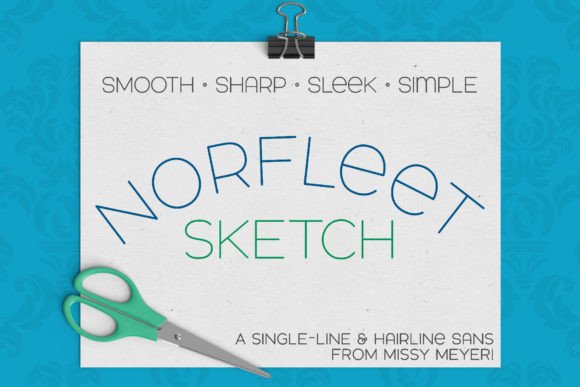
Norfleet Sketch single Line was built exclusively as a single-line font from the ground up. It is not merely a standard font converted into a stroke; rather, it is a clean, elegant sans-serif with smooth curves and lines, minimal nodes, and a modern wide stance. This structural integrity ensures that the vector data is optimized for machine paths rather than screen rendering. The font features a simple double-uppercase aesthetic, with some variants in the lowercase set, such as a round-topped 'A' and a lowercase-style 'e', providing versatility while maintaining a cohesive geometric look.
Navigating the Two Variants: One vs. Two
When selecting Norfleet Sketch for a project, users will encounter two distinct versions, typically designated by the numbers one and two. Understanding the technical difference between these sets is crucial for a successful workflow, as they serve different software environments and output requirements.
Norfleet Sketch One: The True Vector Path
The first variant is a true single-line font. This version is constructed from a single stroke that has a definitive start point and a definitive end point. This is the ideal format for specialized CNC (Computer Numerical Control) software, particularly parametric design programs like Rhinoceros (Rhino). In these environments, the machine reads the vector path directly to determine the movement of the tool, laser, or pen.
However, using this version requires a certain level of proficiency with vector design programs such as Adobe Illustrator, Inkscape, or Affinity Designer. Most standard design programs will automatically attempt to "close" a path when you apply a stroke, connecting the start and end points. For a true single-line font to function correctly in a plotting or engraving context, the path must remain open. Users who are comfortable editing vector paths and removing connections will find this version offers the most precise control over their output.
Norfleet Sketch Two: The Hairline Outline
For users who find the concept of open paths too technical or restrictive, the second variant offers a practical workaround. Norfleet Sketch Two is technically an outline font, but it is designed specifically to mimic the appearance of a single line. The strokes in this version are so close together that they are virtually invisible to the naked eye.
This version is particularly useful for applications where the software automatically closes paths or where the user needs to apply standard fill colors and effects. While it is not a "true" single line in the mathematical sense, it renders as a hairline sketch. This makes it highly compatible with a broader range of design software that may not support open-path typography natively. It bridges the gap between standard vector editing and specialized fabrication requirements.
Practical Applications and Industry Relevance
The utility of Norfleet Sketch single Line extends across various industries, from hobbyist crafting to professional engineering. Its clean, sharp aesthetic makes it suitable for tasks where legibility and speed are paramount.
- Laser Engraving and Cutting: When using a laser engraver on materials like wood, leather, or acrylic, a true single-line font allows the laser to trace the text in a single pass. This significantly reduces production time and creates a fine, etched line rather than a filled block of text.
- Pen Plotting: In the resurgence of analog-digital hybrid art, pen plotters are used to draw vector graphics. Norfleet Sketch is ideal for this medium because it prevents the pen from retracing its steps, which can cause ink bleeding or paper damage.
- CNC Routing and Milling: For CNC routers engraving text into metal or wood, single-line fonts reduce tool wear and machining time. The "sketch" style of Norfleet provides a modern, industrial look that is often preferred over traditional serif fonts.
- Web and Digital Design: Beyond fabrication, the font serves a purpose in digital design. It can be used for minimalist logos, wireframing text, or creating a technical, architectural aesthetic in web graphics.
Design Characteristics and Aesthetics
From a typographic perspective, Norfleet Sketch is defined by its "modern wide stance." This refers to the horizontal width of the characters and the spacing between them. Wide stance fonts tend to feel more open and airy, improving legibility at small sizes—a critical factor when engraving detailed text on physical objects.
The font is described as a "simple double-uppercase" typeface. This implies that the capital letters and the lowercase letters share similar height characteristics, though the lowercase set includes unique variants like the round-topped 'A'. This design choice simplifies the visual hierarchy, making the text block look uniform and geometric. It is clean, sharp, and pairs well with other fonts, allowing designers to use it for headers or accent text alongside body copy in a cohesive design system.
Implementation Considerations for Creators
When implementing Norfleet Sketch in a project, the choice between the "One" and "Two" versions depends on the specific software pipeline.
- Assess Your Software: If you are using standard vector software (like Illustrator) and do not wish to manually edit paths, Norfleet Sketch Two is the safer choice. It will render visually as a single line and print/plot with minimal doubling artifacts.
- Evaluate the Medium: If you are working with a high-precision CNC machine or a parametric design tool (like Grasshopper for Rhino), Norfleet Sketch One is superior. The mathematical precision of the open path ensures the highest quality toolpath generation.
- Test for Scalability: Because it is a vector-based font, Norfleet Sketch scales infinitely without pixelation. However, creators should test the stroke weight at their intended output size. A line that looks good on a screen might be too thin or too thick for a specific engraving depth or pen tip size.
In conclusion, Norfleet Sketch single Line represents a specialized evolution in digital typography. It solves the long-standing problem of applying text to physical manufacturing processes by offering a clean, modern aesthetic engineered for machine reading. Whether through the true vector path of Version One or the hairline outline of Version Two, it empowers creators to bridge the gap between digital design and physical production with elegance and efficiency.