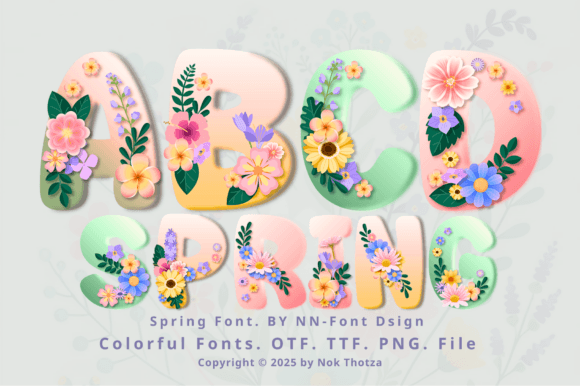
Spring: Integrating Floral Typography for Strategic Visual Communication
In the realm of digital design and marketing, the selection of typography is rarely a casual aesthetic choice; it is a strategic decision that dictates tone, readability, and brand perception. As we approach the second quarter of the year, many businesses and creators face the challenge of refreshing their visual assets to align with seasonal shifts. Spring, in this context, represents more than just a calendar date; it is a specific design asset—a vibrant floral font—that offers a unique opportunity to inject energy and renewal into your projects. However, leveraging a highly decorative typeface like Spring requires a nuanced understanding of visual hierarchy, technical compatibility, and audience psychology to ensure it drives results rather than causing visual clutter.
Understanding the Asset: What is the Spring Font?
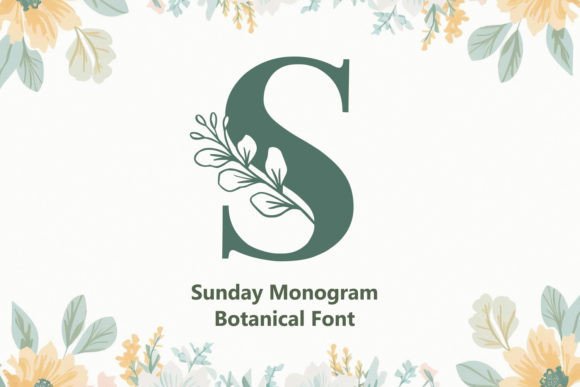
The Spring font is a specialized display typeface designed to bring the vibrant energy of the season into the digital and print space. Unlike standard serif or sans-serif fonts used for body text, Spring is an ornamental asset where each letterform is meticulously adorned with colorful flowers and lush greenery. It is a high-detail design tool intended to serve as a focal point in your visual hierarchy.
Strategically, this type of font fills a specific gap in a designer's toolkit. While minimalist typography dominates corporate communication, there are distinct verticals—hospitality, floristry, event planning, and seasonal retail—where a decorative font like Spring is not just appropriate but necessary to signal the right context immediately. The font is designed to add a touch of elegance and freshness, making it a strong contender for invitations, posters, greeting cards, and seasonal social media campaigns.
Technical Specifications and Workflow Integration
Before integrating Spring into your production pipeline, it is vital to understand its technical composition to avoid workflow bottlenecks. The asset is distributed in OTF, TTF, and PNG formats, offering versatility for various design environments. However, a critical distinction must be made between the black version and the color version of the font, as mismanagement here can lead to significant project delays.
- The Black Version: This iteration is fully compatible with vector-based cutting software, specifically Cricut Design Space and other cutting machines. This makes the black version of Spring ideal for physical product creation, such as vinyl decals, paper cutouts, and monochromatic engraving.
- The Color Version: The vibrant, floral iteration of Spring is designed for digital design software. It is compatible with programs like Adobe Photoshop, Adobe Illustrator, Silhouette Studio (Designer Edition or higher), and Inkscape. Crucially, the OTF and TTF files of the color version are not compatible with Cricut Design Space.
If your goal is to create a physical product using a Cricut machine, you must plan your design using the black outline version of Spring. If your goal is digital marketing assets or print-on-demand designs (like posters or greeting cards), the color version in Photoshop or Illustrator is the correct tool. Ignoring this distinction is a common operational error that wastes time.
Strategic Application: Positioning and Audience Connection
The decision to use the Spring font should be driven by your strategic positioning. Visual communication relies on "semiotics"—the study of signs and symbols. A floral font like Spring communicates specific values: organic growth, femininity, celebration, and nature.
When to Deploy the Spring Aesthetic
Using Spring is most effective when you are trying to evoke an emotional response tied to renewal or celebration. It is a strategic tool for:
- Event Marketing: For wedding planners or event organizers, Spring immediately sets the expectation for a garden party or a formal floral theme. It reduces the cognitive load on the viewer; they instantly understand the "vibe" of the event without reading the details.
- Seasonal Retail: Small business owners in the fashion, home decor, or beauty sectors can use Spring in their headers or sale graphics to signal a "new collection" drop. It visually differentiates Q2 marketing from the heavy, blocky typography often used in winter sales.
- Greeting Cards and Stationery: For creators on platforms like Etsy, Spring provides a high-value, "ready-to-use" aesthetic that can elevate a simple card design into a premium product.
Avoiding Visual Noise
The primary risk of using a detailed font like Spring is visual overload. Because the letters are adorned with intricate flora, using it for long sentences or small body text will render the content illegible. This undermines the user experience and can increase bounce rates on digital platforms.
Strategically, Spring should be reserved for Hero Text—the main headline or the recipient's name on an invitation. Surround it with ample negative space (whitespace) to let the "greenery" breathe. Pair Spring with a clean, neutral sans-serif font for the body copy. This contrast creates a professional balance, ensuring your message is both beautiful and readable.
Operational Efficiency: Leveraging PNG and Vector Formats
For entrepreneurs and marketers, efficiency is a key metric. The inclusion of PNG formats alongside the OTF and TTF files in the Spring package is a significant strategic advantage.
If you are working in a software environment that does not support advanced OpenType features, or if you are collaborating with a team that uses different software, the PNG files allow you to treat the letters as individual graphic elements. This "drag-and-drop" approach can speed up the creation of social media stories or quick mockups where installing a new font might be time-consuming or restricted by IT permissions.
Furthermore, for those using the black version with cutting machines, planning your cuts is essential. Because Spring features organic shapes and curves, intricate cuts require sharp blades and appropriate material settings. A strategic approach involves test-cutting a single letter before committing to a full sheet of expensive vinyl or cardstock. This operational discipline prevents material waste—a tangible impact on your bottom line.
Decision-Making: Context is King
The effectiveness of the Spring font is entirely dependent on context. Using it for a corporate law firm’s annual report would be a catastrophic branding error, signaling a lack of seriousness. Conversely, using a sterile, corporate font for a boutique florist’s logo might signal a lack of creativity.
Before selecting Spring, ask these strategic questions:
- Who is the audience? If your audience values tradition, elegance, and nature, Spring is a strong choice. If they value technology, speed, and minimalism, choose a different asset.
- What is the medium? Spring excels in high-resolution print and digital displays. It may lose impact on very small mobile screens or low-resolution prints where the floral details become muddy.
- What is the lifespan of the design? If this is a timeless brand logo, a seasonal font might feel dated by autumn. If this is a campaign-specific asset for April and May, Spring is perfect.
Conclusion: Elevating Your Visual Assets
Incorporating the Spring font into your design library is a move toward intentional, season-aware marketing. It allows you to tap into the psychological power of nature and renewal, connecting with your audience on an emotional level. By respecting the technical limitations of the color and black versions, and by using the font strategically within a balanced visual hierarchy, you can transform standard invitations, posters, and greeting cards into compelling visual narratives. Use Spring not just as decoration, but as a strategic signal of freshness and quality in your work.