Introducing Retro: A Strategic Guide to Vintage Typography in Modern Design
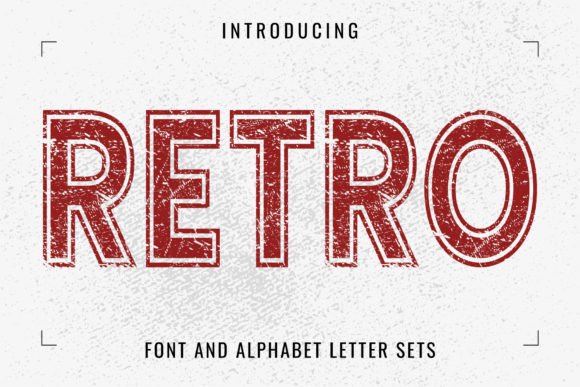
In the current digital landscape, visual communication is saturated with sleek, minimalist sans-serif fonts. While clean typography has its place, it often lacks the emotional resonance required to make a brand truly memorable. This is where Retro, a grunge-distressed display font, enters the workflow. It is not merely a stylistic choice; it is a strategic asset designed to inject personality, history, and texture into projects ranging from corporate branding to casual merchandise. Understanding how to implement a distressed typeface effectively requires a shift in design thinking—moving from simple legibility to evocative storytelling.
Understanding the Asset: What Defines the Retro Aesthetic?
Before integrating any new asset into a project, it is essential to evaluate its technical and aesthetic properties. Retro is characterized by its vintage structure and grunge-distressed texture. Unlike standard fonts that prioritize perfect vector precision, this typeface embraces imperfection. The "distressed" effect simulates the wear and tear of letterpress printing or screen printing ink, providing an instant layer of history to the text.
In a broader design process, this type of font serves as a focal point. It is a display font, meaning it is optimized for headlines, logos, and short bursts of text rather than body copy. When planning a layout, recognizing the hierarchy is crucial. If the background noise of a design is high, a clean font might disappear. Conversely, Retro commands attention. Its value lies in its ability to bridge the gap between modern digital precision and the tactile warmth of analog media.
Pre-Project Planning: Defining the Visual Tone
The integration of Retro begins long before a single pixel is placed in software. It starts during the conceptualization and mood boarding phase. For entrepreneurs and small business owners, the decision to use a vintage-style font should align with brand values. Does the brand promise heritage, durability, or artisanal quality? If the answer is yes, this font becomes a viable candidate.
During the planning stage, consider the following workflow adjustments:
- Audience Analysis: Determine if the target demographic responds to nostalgia. For adults aged 20–50, vintage aesthetics often trigger positive associations with established craftsmanship or pop culture history.
- Contextual Fit: Assess where the font will appear. A grunge-distressed font works exceptionally well on textured backgrounds, such as kraft paper for packaging or dark, moody backdrops for posters.
- Compatibility Checks: Ensure that the project’s secondary font pairs well with the primary display font. Retro generally pairs best with clean, geometric sans-serifs or classic serifs for body text to maintain readability.
Practical Implementation: Workflow Integration
Once the decision to use Retro is made, the execution phase requires specific technical considerations to ensure quality control. Because the font features built-in distressing, the workflow differs slightly from using standard vector fonts.
Logo Design and Branding
When designing a logo, scalability is a primary concern. While Retro adds significant character, the distressed details can sometimes become muddy at very small sizes. A practical workflow tip is to design the logo at a large scale first. Once the composition is finalized, test the logo at the smallest intended application size (such as a favicon or a small print label). If the grunge details merge, you may need to adjust the tracking (letter spacing) or use a slightly bolder weight if available.
Furthermore, consider the color application. Vintage fonts often perform best with solid colors or subtle gradients. Avoid placing Retro over busy photographic backgrounds without a container (like a shape or a slight overlay) to ensure the text remains legible.
Apparel and Merchandise Production
For freelancers and creators working on T-shirt designs or merchandise, Retro is a powerful tool. In the production workflow, specifically screen printing or Direct-to-Garment (DTG) printing, distressed fonts can actually be more forgiving than solid ones. The texture helps hide minor imperfections in fabric weaving or slight ink absorption variations.
When preparing files for print:
- Vector Conversion: Always ensure the text is converted to outlines (curves) in your vector software (like Illustrator). This prevents font substitution errors at the print shop.
- Color Separation: If printing on dark garments, the grunge texture of the font will interact with the underbase white ink. Ensure your design file accounts for this by doing a mock-up of how the black distress marks will look against the white base layer.
- Mock-up Testing: Place the text onto realistic T-shirt mock-ups. The distressed nature of Retro interacts differently with fabric textures than it does on a flat digital screen. Seeing it in context helps in making final adjustments to sizing.
Digital Application: Web and Social Media
In the digital realm, web designers and marketers face different constraints. While web typography has advanced significantly, loading custom fonts with heavy textures can sometimes impact page speed if not optimized. However, Retro is designed as a display font, meaning it is typically used sparingly for headers or Calls to Action (CTAs).
For social media managers and content creators, this font serves as a pattern interrupt. In a feed dominated by clean, corporate aesthetics, a grunge-distressed header can stop the scroll. The implementation process here is about consistency. If you use Retro for a specific campaign—such as a "Flash Sale" or a "Heritage Collection"—create a template. Save these templates in your design tool (e.g., Canva or Photoshop) to ensure that every post in that series maintains a uniform visual language.
Interaction with Other Design Elements
No font exists in a vacuum. The effectiveness of Retro is heavily influenced by its neighbors on the canvas. It interacts with imagery, texture, and negative space.
- Texture Stacking: Avoid using a distressed font on top of a heavily noisy or grunge background. This creates visual chaos. Instead, pair the textured text with a clean, solid background, or a subtle paper texture to let the font details shine.
- Color Theory: Vintage typography often pairs well with muted, earthy tones (sepia, olive, navy) or high-contrast palettes (black and white). Neon colors can work for an 80s retro vibe, but ensure the saturation levels match the "aged" feel of the font.
- Whitespace: Because display fonts are dense, they require ample breathing room. Give Retro significant margins to prevent the design from feeling cluttered.
Quality Control and Long-Term Use
For educators, publishers, and long-term brand builders, the longevity of an asset is key. A font like Retro is timeless if used correctly, but trends in "grunge" aesthetics shift. To future-proof your designs, focus on the structure of the font rather than just the distressing.
Conduct a "squint test" during your review process. Squint your eyes at the design. If the text is legible and the composition holds up, the distressed elements are serving the design. If it becomes a blur of noise, the implementation needs refinement. This step is vital for accessibility and clarity, ensuring that the artistic flair does not compromise the message.
Finally, organize your assets. If you purchase or download Retro, store the font files in a centralized library and document its licensing terms (especially for commercial use in client projects). Keeping your font library organized prevents workflow bottlenecks and ensures that you can easily deploy this asset whenever a project calls for that authentic, vintage character.
By treating Retro